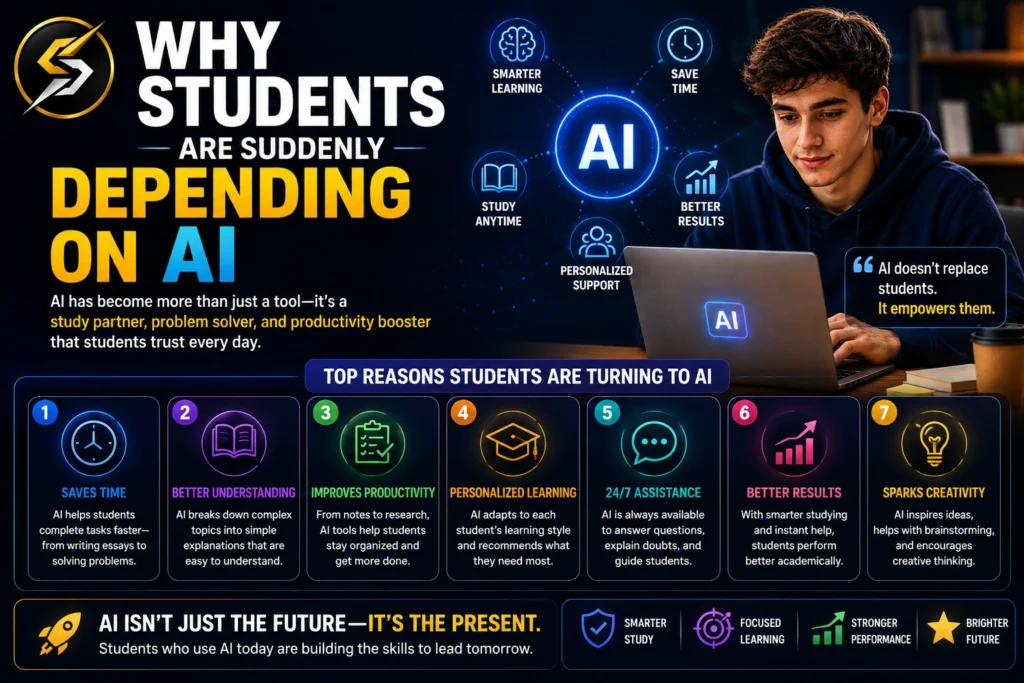
Why Students Are Suddenly Depending on AI
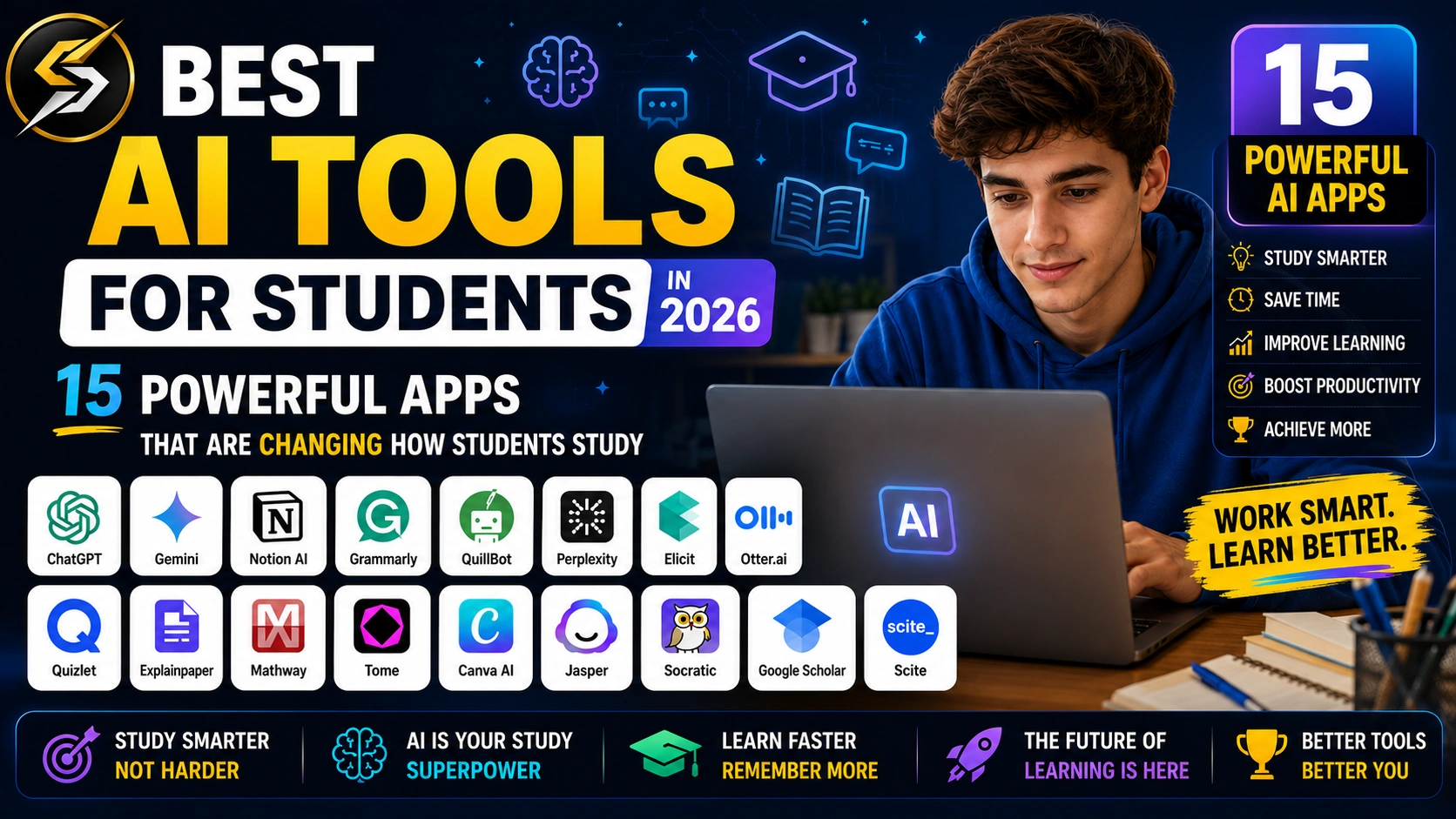
Best AI Tools for Students in 2026
A university student in Seoul recently shared something surprising online.
Instead of spending six exhausting hours rewriting lecture notes before an exam, she uploaded her messy class recordings into an AI study assistant. Within minutes, the software generated organized notes, flashcards, practice questions, and a personalized revision plan.
| AI Tool | Best For | Free Plan | Overall Rating |
|---|---|---|---|
| ChatGPT | Homework, Research, Writing | ✅ Yes | ⭐ 4.9/5 |
| Grammarly | Grammar & Essay Writing | ✅ Yes | ⭐ 4.8/5 |
| Notion AI | Notes & Productivity | ⚠️ Limited | ⭐ 4.7/5 |
| Perplexity AI | Research & Fact-Checking | ✅ Yes | ⭐ 4.8/5 |
| Quizlet AI | Flashcards & Revision | ✅ Yes | ⭐ 4.6/5 |
| Photomath | Mathematics | ✅ Yes | ⭐ 4.7/5 |
| Wolfram Alpha | Advanced STEM Subjects | ⚠️ Limited | ⭐ 4.8/5 |
| Otter.ai | Lecture Notes | ⚠️ Limited | ⭐ 4.6/5 |
| Canva Magic Studio | Presentations & Design | ✅ Yes | ⭐ 4.8/5 |
| Claude | Writing & Research | ✅ Yes | ⭐ 4.8/5 |
| Khanmigo | AI Tutoring | ❌ No | ⭐ 4.7/5 |
| Gemini | Google Productivity | ✅ Yes | ⭐ 4.7/5 |
| Elicit | Academic Research | ⚠️ Limited | ⭐ 4.8/5 |
| Duolingo Max | Language Learning | ❌ No | ⭐ 4.7/5 |
| Motion | Time Management | ❌ No | ⭐ 4.7/5 |
Look, depending or not depending on AI doesn’t just happen because I say so or because you do it. The reality is, from a student’s perspective, AI can become that friend with whom you absolutely love to study. Moreover, it can easily solve those problems for you that you might struggle with for days. In this article, n this article, we’ll explore the best AI tools for students in 2026 and see how they can help with studying, assignments, productivity, research, and exam preparation.
That story exploded because millions of students quietly relate to it.
School pressure has changed dramatically. Students today are expected to:
- learn faster
- multitask constantly
- manage digital distractions
- absorb huge amounts of information
- stay productive almost 24/7
And honestly? Traditional study methods alone are starting to feel painfully slow.
That’s why AI tools for students have become one of the biggest education trends of 2026.
But here’s the important part most articles miss:
Student life change article Best AI Tools for Students in 2026
The best students are not using AI to avoid learning.
They’re using it to learn smarter.
How AI Is Changing Modern Education
A few years ago, AI in education felt experimental.
Now it’s becoming part of everyday student life.
Students use AI for:
- summarizing long lectures
- generating study notes
- solving math problems
- organizing assignments
- improving writing
- creating flashcards
- learning languages
- researching topics faster
- managing productivity
What makes this shift fascinating is that AI isn’t replacing human learning entirely.
Instead, it’s acting like a personalized academic assistant available 24/7.
That convenience is exactly why searches for:
- AI tools for homework
- best AI apps for students
- free AI tools for students
- AI study tools for students
have exploded globally.
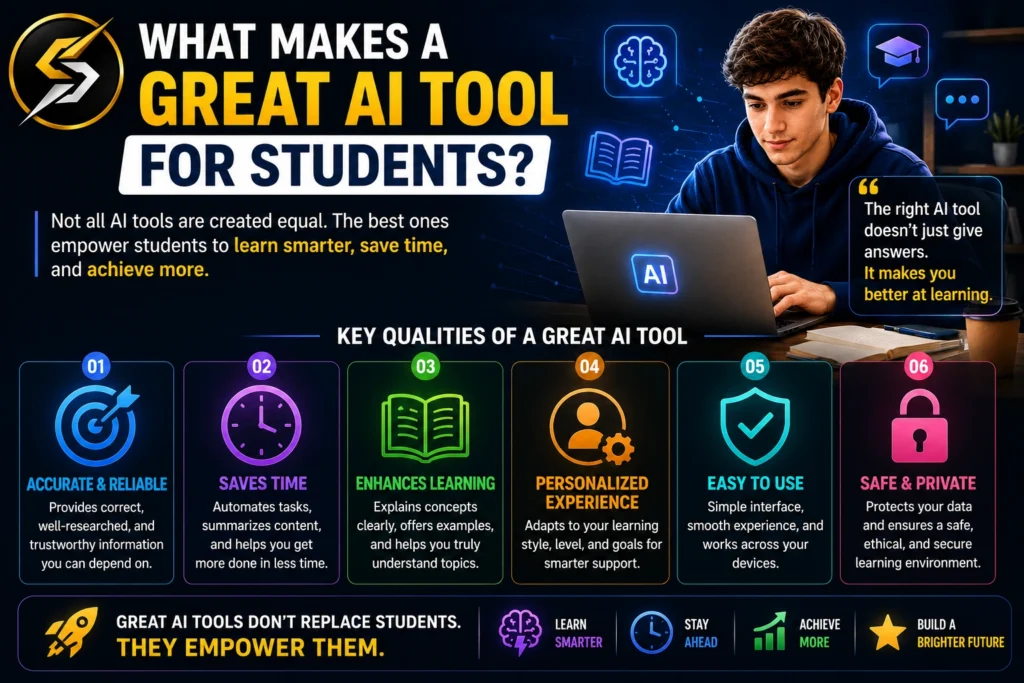
What Makes a Great AI Tool for Students?
Not every AI app deserves the hype.
Some tools look impressive on social media but create more confusion than actual value.
The best AI tools for college students usually share a few important qualities:
| Feature | Why It Matters |
|---|---|
| Accuracy | Wrong answers destroy trust |
| Simplicity | Students need speed, not complexity |
| Cross-device support | Learning happens everywhere |
| Affordable pricing | Most students have limited budgets |
| Study-focused features | Generic AI tools often waste time |
| Privacy protection | Student data matters |
The difference between useful AI and distracting AI often comes down to one thing:
Does the tool genuinely reduce mental workload?
Best AI Tools for Students in 2026
15 Best AI Tools for Students in 2026
1. ChatGPT
Still one of the most widely used AI tools for learning.
Students use ChatGPT for:
- brainstorming ideas
- explaining difficult concepts
- rewriting notes
- creating summaries
- practicing interview questions
- coding help
- language learning
ChatGPT Pros and Cons For Student:
| ChatGPT Pros for Students | ChatGPT Cons for Students |
|---|---|
| Explains complex topics in simple language | Can sometimes provide inaccurate information |
| Helps create summaries, notes, and study guides quickly | Requires fact-checking before using in assignments |
| Available 24/7 for learning support | Overreliance can reduce critical thinking skills |
| Useful for brainstorming essays and project ideas | May not fully understand highly specialized topics |
| Assists with coding, math, science, and language learning | Advanced features require a paid subscription |
| Saves time on research and content organization | Some schools restrict AI-generated work |
| Helps improve writing clarity and grammar | AI-generated answers can occasionally sound generic |
| Supports multiple languages for global students | Cannot replace teachers, mentors, or hands-on learning |
| Great for exam preparation and practice questions | Privacy concerns may arise if sensitive data is shared |
| Easy to use on mobile, desktop, and web | Requires internet access for most features |
Quick Verdict
Best For:
- Homework Assistance
- Concept Explanations
- Essay Writing
- Research Summaries
- Study Notes
- Coding Help
- Brainstorming Ideas
Not Ideal For:
- Replacing Academic Sources
- Direct Citations in Research Papers
- Highly Specialized Expert Advice
- Blindly Completing Assignments Without Verification
Overall Rating:
⭐⭐⭐⭐⭐ 4.9/5
Why Students Love It
ChatGPT has become one of the most widely used AI tools among students because of its versatility. Whether a student needs help understanding a difficult concept, summarizing lengthy notes, generating essay ideas, practicing interview questions, learning to code, or preparing for exams, ChatGPT can assist within seconds.
What makes ChatGPT particularly valuable is its ability to explain complex topics in simple language. Instead of searching through multiple websites or textbooks, students can ask follow-up questions and receive personalized explanations tailored to their level of understanding. When used responsibly, it helps students save time, improve productivity, and learn more efficiently. Its combination of accessibility, flexibility, and academic support makes it one of the best AI study tools for students in 2026.
General studying, explanations, productivity, and writing support.
2. Grammarly
Most students think Grammarly is just a grammar checker.
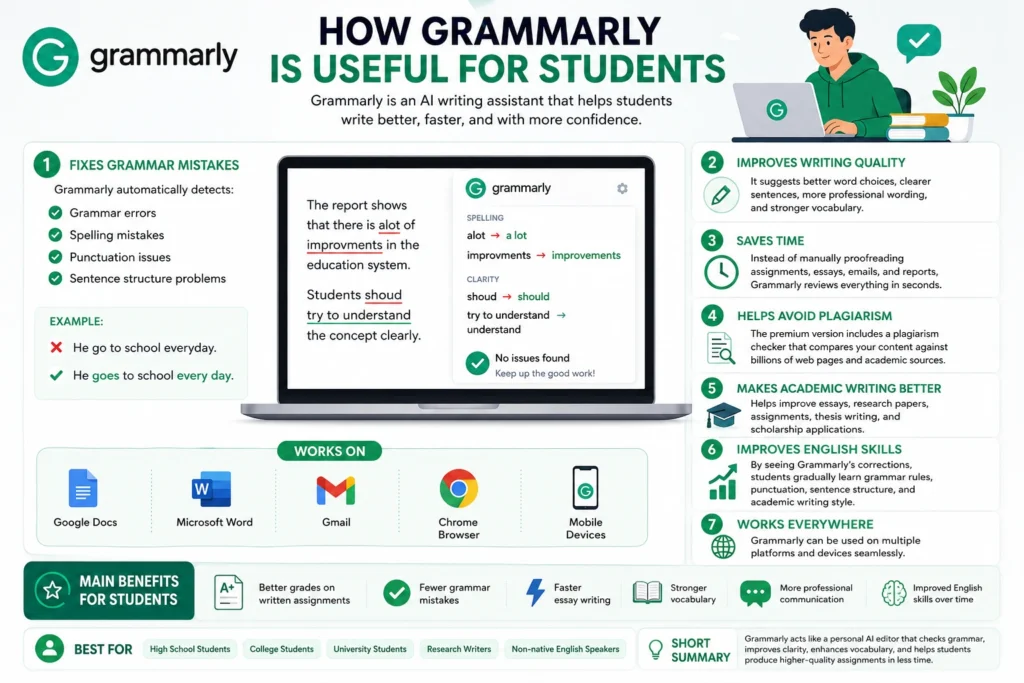
It’s far more powerful now.
In 2026, Grammarly helps students:
- improve academic tone
- rewrite awkward sentences
- detect clarity issues
- organize writing flow
- avoid accidental plagiarism
Grammarly Pros and Cons for Students:
| Grammarly Pros for Students | Grammarly Cons for Students |
|---|---|
| Helps identify grammar, spelling, and punctuation mistakes | Premium features require a paid subscription |
| Improves clarity and readability of essays and assignments | Suggestions are not always perfect and may need review |
| Provides real-time writing feedback | Can sometimes change the intended meaning of a sentence |
| Helps students develop stronger writing skills over time | Less useful for highly technical or specialized academic writing |
| Detects tone and suggests more professional wording | Internet connection is required for most features |
| Reduces proofreading time before submission | Overreliance may prevent students from learning grammar rules themselves |
| Integrates with browsers, Microsoft Word, and Google Docs | Advanced plagiarism checking is only available in paid plans |
| Useful for emails, reports, essays, and research papers | Free version has limited functionality |
| Helps non-native English speakers write more confidently | May occasionally flag correct phrases as errors |
| Easy to use across desktop and mobile devices | Cannot replace human editing for important academic work |
Quick Verdict
Best For:
- Essay Writing
- Assignment Editing
- Research Papers
- Grammar Correction
- Academic Writing
- Email Writing
- Improving English Skills
Not Ideal For:
- Mathematical Problem Solving
- Scientific Calculations
- Research Discovery
- Note-Taking Management
- Project Planning
Overall Rating:
⭐⭐⭐⭐⭐ 4.8/5
Why Students Love It
Grammarly has become one of the most trusted AI writing tools for students because it helps transform average writing into polished, professional work. Beyond correcting grammar and spelling mistakes, Grammarly improves sentence clarity, readability, tone, and overall writing quality.
For students who regularly write essays, assignments, research papers, emails, and reports, Grammarly acts like a personal editor working in the background. It catches mistakes that are easy to overlook and offers suggestions that make writing more concise and effective. Non-native English speakers especially benefit from its real-time feedback, helping them write with greater confidence. In 2026, Grammarly remains one of the best AI tools for students looking to improve their writing skills and submit stronger academic work.
3. Notion AI
Notion transformed from a productivity app into a serious AI workspace.
Students now use it to:
- organize semester plans
- summarize lecture notes
- create study databases
- manage deadlines
- generate revision checklists
Notion AI Pros and Cons for Students:
| Notion AI Pros for Students | Notion AI Cons for Students |
|---|---|
| Organizes notes, assignments, and study materials in one place | Can feel overwhelming for first-time users |
| Generates summaries from long notes and documents | Advanced AI features require a paid plan |
| Helps create study plans and task lists automatically | Initial setup can take time |
| Improves productivity by keeping everything organized | Requires a stable internet connection for AI features |
| Useful for brainstorming ideas and project planning | AI-generated content may need fact-checking |
| Can convert messy notes into structured formats | Not specifically designed for solving academic problems |
| Supports collaboration for group projects | Some features have a learning curve |
| Integrates notes, databases, calendars, and tasks in one workspace | Heavy workspaces may feel slower on older devices |
| Helps students track deadlines and exam schedules | Free plan has limitations for advanced users |
| Works across desktop, web, and mobile devices | Over-customization can become a distraction from studying |
Quick Verdict
Best For:
- Note-Taking
- Study Planning
- Assignment Management
- Project Organization
- Productivity Tracking
- Semester Planning
- Group Collaboration
Not Ideal For:
- Solving Homework Problems
- Advanced Academic Research
- Mathematical Calculations
- Graphic Design Projects
- Instant AI Tutoring
Overall Rating:
⭐⭐⭐⭐⭐ 4.7/5
Why Students Love It
Notion AI is much more than a note-taking app. It serves as an all-in-one academic workspace where students can organize notes, manage assignments, track deadlines, create study plans, and collaborate on projects without constantly switching between different apps.
What makes Notion AI especially useful is its ability to turn messy information into structured content. Students can summarize lecture notes, generate study guides, create task lists, and organize entire semesters from a single dashboard. For those juggling multiple subjects, assignments, exams, and extracurricular activities, Notion AI brings clarity to academic chaos. Its combination of organization, productivity, and AI-powered assistance makes it one of the most valuable study tools for students in 2026.
4. Perplexity AI
Perplexity became popular because students were getting tired of unreliable search results.
Unlike many AI chatbots, Perplexity provides cited answers and live web-backed responses.
That matters enormously for:
- academic research
- fact-checking
- assignment preparation
Perplexity AI Pros and Cons for Students:
| Perplexity AI Pros for Students | Perplexity AI Cons for Students |
|---|---|
| Provides answers with source citations for easier verification | Some advanced features require a Pro subscription |
| Excellent for academic research and fact-finding | Sources should still be reviewed for accuracy |
| Delivers up-to-date information from the web | May occasionally misunderstand complex questions |
| Saves time by summarizing multiple sources into one answer | Not all cited sources are equally authoritative |
| Helps students discover relevant articles, studies, and reports | Can encourage shortcut learning if used improperly |
| Easy-to-understand explanations for complex topics | Limited customization compared to some AI assistants |
| Useful for research papers and assignment preparation | Internet connection is required |
| Supports follow-up questions for deeper exploration | May not provide detailed solutions for every subject |
| Faster than traditional search engines for many research tasks | Some responses can be overly concise |
| User-friendly interface with minimal distractions | Free version has usage limitations |
Quick Verdict
Best For:
- Academic Research
- Fact-Checking
- Assignment Preparation
- Finding Reliable Sources
- Research Papers
- Learning Complex Topics
- Quick Information Discovery
Not Ideal For:
- Advanced Mathematical Calculations
- Graphic Design Projects
- Presentation Creation
- Project Management
- Replacing Academic Citations
Overall Rating:
⭐⭐⭐⭐⭐ 4.8/5
Why Students Love It
Perplexity AI has quickly become a favorite among students because it combines the speed of artificial intelligence with the credibility of source-backed research. Unlike many AI chatbots that simply provide answers, Perplexity often shows the sources behind its responses, making it easier for students to verify information and explore topics in greater depth.
For research papers, assignments, presentations, and everyday learning, Perplexity helps students find relevant information in minutes instead of spending hours browsing multiple websites. Its ability to summarize complex topics, answer follow-up questions, and surface trustworthy sources makes it one of the most valuable AI research tools for students in 2026. For students who care about accuracy and efficiency, Perplexity offers an ideal balance between AI convenience and reliable information.
5. Quizlet AI
Flashcards are still incredibly effective for memory retention.
Quizlet’s AI features now automatically generate:
- quizzes
- flashcards
- practice tests
- study games
Quizlet AI Pros and Cons for Students:
| Quizlet AI Pros for Students | Quizlet AI Cons for Students |
|---|---|
| Automatically creates flashcards from study materials | Some advanced AI features require a paid subscription |
| Helps improve memorization through active recall | Less effective for subjects that require deep conceptual understanding |
| Generates practice tests and quizzes instantly | AI-generated flashcards may occasionally need editing |
| Makes exam preparation more interactive and engaging | Limited customization in the free version |
| Supports spaced repetition for better long-term retention | Not ideal for complex research-based assignments |
| Covers a wide range of subjects and topics | Heavy reliance on flashcards may encourage rote learning |
| Easy to study on mobile, tablet, and desktop devices | Some study sets created by users may contain errors |
| Saves time compared to creating flashcards manually | Requires internet access for most features |
| Useful for language learning, definitions, and key concepts | Premium plans can be expensive for some students |
| Offers study games and learning modes that reduce boredom | Not a replacement for comprehensive note-taking or textbook study |
QQuick Verdict
Best For:
- Flashcards
- Exam Preparation
- Vocabulary Building
- Language Learning
- Memorization
- Self-Testing
- Quick Revision Sessions
Not Ideal For:
- Deep Academic Research
- Essay Writing
- Complex Problem Solving
- Project Management
- Long-Form Note-Taking
Overall Rating:
⭐⭐⭐⭐⭐ 4.6/5
Why Students Love It
Quizlet AI makes studying faster, more interactive, and far less repetitive. Instead of spending hours creating flashcards manually, students can instantly generate study materials, practice quizzes, and revision sets from their notes and textbooks.
What makes Quizlet especially effective is its focus on active recall and spaced repetition—two learning techniques widely recognized for improving memory retention. Whether preparing for exams, learning a new language, or reviewing important concepts before a test, Quizlet helps students retain information more efficiently. Its combination of AI-powered study tools, mobile accessibility, and engaging learning modes makes it one of the best revision tools for students in 2026.
6. Photomath
Math anxiety remains painfully common worldwide.
Best AI Tools For Students In 2026
Photomath is essentially your personal math tutor and expert. It makes complex math queries easy and reliable to understand by guiding you step-by-step. Additionally, you can use it to format and create clean math documentation. For students looking to earn extra money, mastering this tool can help you provide high-quality math assistance and virtual tutoring services online.
Photomath became one of the best AI tools for homework because it explains solutions step-by-step instead of only showing answers.
Photomath Pros and Cons for Students
| Photomath Pros for Students | Photomath Cons for Students |
|---|---|
| Solves math problems instantly using a smartphone camera | Advanced explanations and features require a paid subscription |
| Provides step-by-step solutions instead of just answers | Students may become dependent on the app for homework |
| Helps understand mathematical concepts more clearly | Not all solutions explain the underlying theory in depth |
| Supports algebra, geometry, calculus, and other math topics | Can reduce problem-solving practice if overused |
| Saves time when checking homework and assignments | May occasionally struggle with very complex equations |
| Useful for self-study and exam preparation | Requires a clear image for accurate scanning |
| Easy-to-use interface suitable for beginners | Internet may be needed for some advanced features |
| Helps identify mistakes in calculations quickly | Limited usefulness outside mathematics-related subjects |
| Available on both Android and iOS devices | Teachers may discourage excessive reliance on solution apps |
| Makes learning math less intimidating for many students | Cannot fully replace classroom instruction or tutoring |
Quick Verdict
Best For:
- Mathematics Homework
- Algebra
- Geometry
- Calculus
- Exam Preparation
- Self-Study
- Understanding Step-by-Step Solutions
Not Ideal For:
- Essay Writing
- Research Projects
- Note-Taking
- Language Learning
- Non-Mathematical Subjects
Overall Rating:
⭐⭐⭐⭐⭐ 4.7/5
Why Students Love It
Photomath has earned a loyal following among students because it makes mathematics far less intimidating. By simply scanning a problem with a smartphone camera, students can instantly receive a detailed, step-by-step explanation instead of just the final answer.
This approach helps learners understand the reasoning behind each solution, making it easier to grasp difficult concepts and avoid repeating mistakes. Whether tackling algebra equations, geometry problems, or calculus assignments, students can use Photomath as an on-demand study companion. Its simplicity, accuracy, and focus on learning rather than answer-giving make it one of the most effective AI-powered math tools available for students in 2026.
7. Wolfram Alpha
This tool feels like a secret weapon for STEM students.
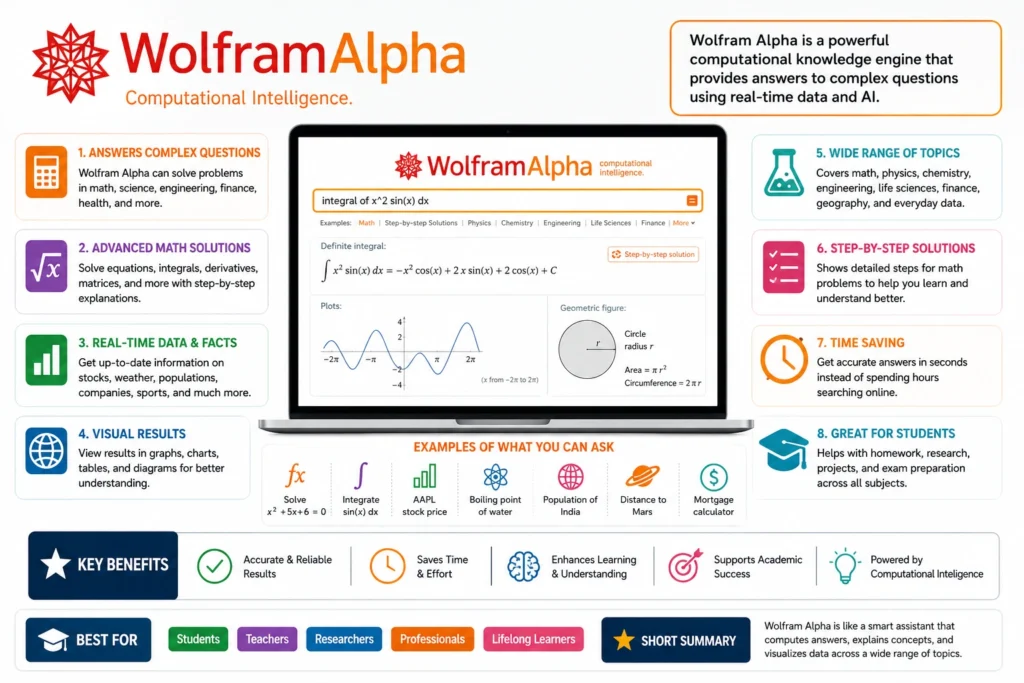
It handles:
- advanced calculations
- equations
- data analysis
- engineering problems
- scientific computation
Many university students quietly rely on it during difficult coursework.
Wolfram Alpha Pros and Cons for Students:
| Wolfram Alpha Pros for Students | Wolfram Alpha Cons for Students |
|---|---|
| Solves complex math, science, and engineering problems accurately | Advanced features require a Pro subscription |
| Provides step-by-step solutions for many subjects | Can feel intimidating for beginners |
| Excellent for mathematics, physics, chemistry, and statistics | Interface is less beginner-friendly than some AI tools |
| Handles equations, graphs, and data analysis instantly | Explanations may be too technical for younger students |
| Useful for university-level and advanced coursework | Not designed for essay writing or creative assignments |
| Generates detailed calculations with high accuracy | Requires proper input formatting for best results |
| Supports research and analytical problem-solving | Some features have a learning curve |
| Saves significant time on complex calculations | Can encourage answer-seeking instead of concept learning if misused |
| Covers a wide range of STEM subjects in one platform | Internet connection is required for most functionality |
| Trusted by students, researchers, and educators worldwide | Less useful for non-STEM subjects |
Quick Verdict
Best For:
- Mathematics
- Engineering
- Physics
- Chemistry
- Statistics
- Data Analysis
- Advanced STEM Subjects
Not Ideal For:
- Essay Writing
- Creative Writing
- Note-Taking
- Presentation Design
- General Productivity Tasks
Overall Rating:
⭐⭐⭐⭐⭐ 4.8/5
Why Students Love It
Wolfram Alpha is often described as a “computational knowledge engine,” but for students, it feels more like a powerful academic problem-solving assistant. Instead of simply providing answers, it can break down complex equations, generate graphs, analyze data, and explain advanced concepts across mathematics, engineering, physics, chemistry, and statistics.
For university and STEM students, it can save hours of manual calculations while helping them understand the logic behind the solution. Its accuracy, depth, and ability to handle complex academic problems make it one of the most valuable AI-powered learning tools available in 2026.
Similar to Photomath, Wolfram Alpha is a highly efficient tool, but with a much broader scope. While Photomath focuses primarily on school-level math, this computational knowledge engine allows you to easily solve complex scientific equations, physics formulas, and engineering-related queries. It serves as an incredibly powerful asset for advanced students. Moreover, you can utilize its specialized capabilities as a freelancer to offer technical problem-solving, data analysis, and tutoring services on top platforms.
8. Otter.ai
Students often struggle to focus during lectures while simultaneously taking notes.
Otter.ai can save the day. By using this tool, you can prevent your valuable time and lectures from going to waste as it automatically converts spoken words into highly accurate real-time text notes. This allows you to focus entirely on listening rather than rushing to write everything down.
Otter.ai solves that problem by transcribing lectures in real time.
Otter.ai Pros and Cons for Students:
| Otter.ai Pros for Students | Otter.ai Cons for Students |
|---|---|
| Transcribes lectures and meetings in real time | Advanced features require a paid subscription |
| Saves students from taking extensive manual notes | Accuracy may decrease in noisy environments |
| Generates searchable transcripts for easy revision | Strong accents or unclear speech can affect transcription quality |
| Helps capture important details that might be missed during lectures | Requires internet access for most features |
| Supports recording and note organization in one platform | Free plan has monthly transcription limits |
| Useful for online classes, seminars, and group discussions | Not all languages are supported equally |
| Makes reviewing lectures much faster and more efficient | AI-generated transcripts may require minor corrections |
| Allows students to focus on understanding rather than typing notes | Can consume device battery during long recording sessions |
| Works across desktop, mobile, and web platforms | Privacy concerns may arise when recording sensitive discussions |
| Excellent for students with accessibility or note-taking challenges | Not a replacement for active listening and participation |
Quick Verdict
Best For:
- Lecture Transcription
- Online Classes
- Meeting Notes
- Study Revision
- Group Discussions
- Research Interviews
Not Ideal For:
- Mathematics Problem Solving
- Essay Writing
- Homework Assistance
- Creative Projects
- Subjects Requiring Visual Explanations
Overall Rating:
⭐⭐⭐⭐⭐ 4.6/5
Why Students Love It:
Otter.ai acts like a personal note-taking assistant that never gets tired. Instead of rushing to write everything down during lectures, students can stay focused on understanding the lesson while Otter automatically records and transcribes important information for later review. This makes it one of the most useful AI productivity tools for students in 2026.
Many students later convert those transcripts into summarized revision notes using other AI tools.
9. Canva Magic Studio
Presentations matter more than ever in modern education.
Canva’s AI tools help students:
- generate slides
- create visual projects
- build infographics
- improve presentations quickly
Canva Magic Studio Pros and Cons for Students:
| Canva Magic Studio Pros for Students | Canva Magic Studio Cons for Students |
|---|---|
| Creates professional presentations quickly | Some premium AI features require a Canva Pro subscription |
| AI-powered design tools save significant time | Advanced customization options may be limited compared to professional design software |
| Generates images, graphics, and visual content easily | AI-generated visuals may sometimes need manual adjustments |
| Beginner-friendly interface with no design experience required | Internet connection is required for most AI features |
| Offers thousands of templates for school projects | Free version has limited access to premium assets |
| Helps students create eye-catching infographics and reports | Large projects can become slow on low-end devices |
| Supports collaboration for group assignments | AI-generated content may not always match academic requirements perfectly |
| Includes tools for social media, posters, and videos | Overusing templates can make projects look less unique |
| Available on desktop, web, and mobile devices | Some generated designs may require additional editing for originality |
| Makes visual storytelling easier and more engaging | Not ideal for highly technical or specialized graphic design work |
Quick Verdict
Best For:
- Presentations
- School Projects
- Infographics
- Posters
- Social Media Assignments
- Visual Content Creation
Not Ideal For:
- Advanced Graphic Design
- Professional Illustration Work
- Complex Engineering Diagrams
- Technical Design Projects
Overall Rating:
⭐⭐⭐⭐⭐ 4.8/5
Why Students Love It:
Canva Magic Studio helps students turn ordinary assignments into visually impressive projects without needing professional design skills. From presentation slides and infographics to posters and videos, it dramatically reduces design time while making academic work look more polished and engaging. This makes it one of the best AI productivity and creativity tools for students in 2026.
Students with zero design experience can suddenly create polished academic work.
10. Claude
Claude became especially popular among students who prefer more thoughtful long-form responses.
While this software shares some similarities with ChatGPT, its responses are exceptionally nuanced and detailed. Claude is highly capable of understanding deep academic context, making it a favorite for students who need comprehensive research support.
Many users find it excellent for:
- detailed explanations
- essay refinement
- deep topic analysis
- academic brainstorming
Claude Pros and Cons for Students:
| Claude Pros for Students | Claude Cons for Students |
|---|---|
| Excellent at explaining complex topics in a clear and natural way | Some advanced features require a paid subscription |
| Produces detailed and thoughtful responses | May occasionally provide inaccurate information and requires fact-checking |
| Strong writing assistance for essays and assignments | Not a replacement for academic research sources |
| Handles long documents and large amounts of text effectively | Can sometimes be overly cautious in certain responses |
| Helpful for brainstorming ideas and project planning | Internet access is required |
| Good at summarizing research papers and notes | Response quality depends heavily on the user’s prompt |
| Supports coding, problem-solving, and learning assistance | May struggle with highly specialized or niche topics |
| Generates human-like and easy-to-read content | Free version may have usage limits during peak times |
| Useful for study guides, revision notes, and concept explanations | Students can become overly dependent on AI assistance |
| Available across web and mobile platforms | Academic policies may restrict AI-generated work in some institutions |
Quick Verdict
Best For:
- Essay Writing
- Research Summaries
- Study Notes
- Concept Explanations
- Brainstorming Ideas
- Academic Writing Support
Not Ideal For:
- Direct Academic Citations
- Advanced Scientific Research Without Verification
- Mathematics Requiring Detailed Step-by-Step Calculations
- Replacing Original Critical Thinking
Overall Rating:
⭐⭐⭐⭐⭐ 4.8/5
Why Students Love It:
Claude stands out for its ability to provide detailed, thoughtful, and highly readable explanations. Many students prefer it for essay writing, research summaries, and understanding difficult concepts because its responses often feel more natural and structured than traditional AI chatbots. For students who regularly work with long documents, reports, and academic material, Claude can act like a patient study partner available at any time.
Its conversational tone feels less robotic than many alternatives.
11. Khanmigo
Built around education rather than general AI conversation, Khanmigo focuses heavily on guided learning.
This tool is incredibly useful for both teachers and students alike, thanks to its exceptional guidance capabilities. Unlike traditional AI tools that simply hand over the answers Khanmigo acts as an interactive coach guiding users step-by-step through complex concepts to ensure actual learning happens
Khanmigo Pros and Cons for Students:
| Khanmigo Pros for Students | Khanmigo Cons for Students |
|---|---|
| Built specifically for education and student learning | Not available in every country |
| Acts like a personal AI tutor rather than simply giving answers | Some features may require a paid subscription |
| Encourages critical thinking and problem-solving skills | Less versatile than general-purpose AI tools |
| Provides guided learning instead of direct answer dumping | Limited support for advanced university-level research |
| Helps students understand concepts step by step | Internet connection is required |
| Covers subjects including math, science, history, and English | Not ideal for professional content creation |
| Supports personalized learning experiences | Availability depends on Khan Academy services |
| Safe learning environment designed for students and educators | Fewer integrations compared to productivity-focused AI tools |
| Helps reduce homework frustration without encouraging cheating | Can occasionally misunderstand complex questions |
| Backed by the trusted educational platform Khan Academy | Still evolving compared to more mature AI platforms |
Quick Verdict
Best For:
- Guided Learning
- Homework Help
- Mathematics
- Science Subjects
- Concept Understanding
- Personalized Tutoring
Not Ideal For:
- Advanced Academic Research
- Professional Writing
- Graphic Design Projects
- Large-Scale Productivity Management
- Complex Content Creation
Overall Rating:
⭐⭐⭐⭐⭐ 4.7/5
Why Students Love It:
Khanmigo feels less like a chatbot and more like a patient tutor sitting beside you. Instead of handing out answers immediately, it guides students through the thinking process, helping them understand concepts on their own. This approach makes learning more meaningful and helps students build confidence, especially in subjects like math and science where understanding the process matters as much as getting the correct answer.
Instead of simply giving answers, it encourages students to think critically.
That approach aligns better with real learning psychology.
12. Google Gemini
Google integrated Gemini deeply into its ecosystem, making it especially useful for students already using:
- Google Docs
- Gmail
- Google Drive
- Android devices
Gemini Pros and Cons for Students:
| Gemini Pros for Students | Gemini Cons for Students |
|---|---|
| Seamlessly integrates with Google Docs, Gmail, Drive, and other Google services | Some advanced AI features require a paid Google AI plan |
| Provides fast answers and research assistance | Responses may occasionally contain inaccuracies and require verification |
| Helps summarize documents, articles, and study materials | Not all features are available in every country |
| Useful for brainstorming assignments and project ideas | Can sometimes provide overly brief explanations |
| Supports text, images, and multimodal interactions | Quality of responses depends on the clarity of prompts |
| Assists with writing, note-taking, and productivity tasks | Not a replacement for academic sources or research papers |
| Works across desktop, Android, and web platforms | Internet connection is required |
| Helpful for organizing schedules and managing academic workflows | Some educational institutions may restrict AI-generated content |
| Strong integration with Google Search ecosystem | Advanced features may feel overwhelming for beginners |
| Regularly updated with new AI capabilities | Students may become overly dependent on AI assistance |
Quick Verdict
Best For:
- Research and Information Gathering
- Google Docs Productivity
- Assignment Planning
- Study Notes
- Brainstorming Ideas
- Everyday Academic Tasks
Not Ideal For:
- Advanced Academic Citations
- Highly Specialized Research
- Complex Mathematical Problem Solving
- Replacing Human Critical Thinking
Overall Rating:
⭐⭐⭐⭐⭐ 4.7/5
Why Students Love It:
Gemini fits naturally into the tools many students already use every day. Because it works closely with Google Docs, Gmail, Drive, and Search, students can research, write, organize notes, and manage assignments without constantly switching between apps. Its speed, convenience, and deep integration with the Google ecosystem make it one of the most practical AI tools for students in 2026.
The productivity integration feels seamless.
13. Elicit
Research-heavy students often mention the same frustration:
Academic papers take forever to review.
Elicit helps summarize research papers, extract findings, and speed up literature reviews.
For postgraduate students, this can save enormous amounts of time.
Elicit Pros and Cons for Students:
| Elicit Pros for Students | Elicit Cons for Students |
|---|---|
| Specially designed for academic research and literature reviews | Some advanced features require a paid subscription |
| Helps find relevant research papers quickly | Coverage may vary across different academic fields |
| Summarizes research papers in a simple and understandable format | Not every paper in the database is available in full text |
| Extracts key findings, methodologies, and conclusions automatically | Students still need to verify sources and findings |
| Saves hours of manual research work | Less useful for homework that doesn’t involve research |
| Excellent for thesis, dissertations, and university projects | Can feel overwhelming for beginners unfamiliar with academic research |
| Helps compare multiple studies on the same topic | Internet connection is required |
| Reduces the time spent reading lengthy academic papers | Not designed for creative writing or content creation |
| Supports evidence-based learning and fact-checking | Some highly specialized papers may be missing |
| Useful for postgraduate and research-focused students | Has a learning curve compared to general AI chatbots |
Quick Verdict
Best For:
- Academic Research
- Literature Reviews
- Research Papers
- Thesis Writing
- University Projects
- Evidence-Based Learning
Not Ideal For:
- Creative Writing
- Graphic Design
- Basic Homework Assistance
- Presentation Design
- Daily Productivity Tasks
Overall Rating:
⭐⭐⭐⭐⭐ 4.8/5
Why Students Love It:
Elicit is like having a research assistant that works around the clock. Instead of spending hours searching through academic databases, students can quickly find relevant studies, compare research findings, and understand complex papers in a fraction of the time. For university students, researchers, and anyone working on a thesis or major academic project, Elicit can dramatically speed up the research process while improving the quality of information gathered.
14. Duolingo Max
Language learning became surprisingly AI-driven.
Duolingo Max now includes AI-powered conversation practice and adaptive learning systems.
Duolingo is the most powerful tool for students.
Students preparing for international education programs find it particularly useful.
Duolingo Max Pros and Cons for Students:
| Duolingo Max Pros for Students | Duolingo Max Cons for Students |
|---|---|
| Uses AI to create more interactive language learning experiences | Duolingo Max requires a paid subscription |
| Provides realistic AI-powered conversation practice | Available for a limited number of languages compared to standard Duolingo |
| Helps improve speaking, reading, writing, and listening skills | Not a complete replacement for real-life language immersion |
| Personalized lessons adapt to individual learning progress | Advanced learners may find some lessons too basic |
| Makes language learning fun through gamification | Internet connection is required for most features |
| Offers detailed explanations for mistakes and answers | Some AI explanations may occasionally lack depth |
| Encourages consistent daily study habits | Premium pricing may not fit every student’s budget |
| Available on mobile and desktop platforms | Progress can slow if users rely only on short daily sessions |
| Great for students preparing for international studies or travel | Less effective for mastering highly specialized vocabulary |
| User-friendly interface suitable for beginners | AI conversation practice cannot fully replicate human interaction |
15. Motion
Time management is one of the biggest student problems nobody talks about enough.
Motion uses AI scheduling to automatically organize:
- study sessions
- deadlines
- tasks
- calendars
Motion Pros and Cons for Students:
| Motion Pros for Students | Motion Cons for Students |
|---|---|
| Automatically creates and adjusts study schedules using AI | Requires a paid subscription with no generous free plan |
| Helps students manage assignments, deadlines, and exams efficiently | Can feel expensive compared to other productivity tools |
| Reduces time spent manually planning daily tasks | Initial setup may take some time |
| Automatically reprioritizes tasks when schedules change | May feel overwhelming for students who prefer simple to-do lists |
| Integrates calendars, tasks, and project management in one place | Internet connection is required |
| Helps reduce procrastination by scheduling work automatically | Less useful for students with highly unpredictable schedules |
| Provides a clear overview of workload and priorities | Learning curve for first-time users |
| Useful for balancing studies, work, and personal commitments | Limited academic-specific features compared to study-focused apps |
| Available across desktop and mobile platforms | Some integrations may require additional setup |
| Can significantly improve productivity and time management habits | AI scheduling may not always match personal preferences perfectly |
Quick Verdict
Best For:
- Time Management
- Study Planning
- Assignment Tracking
- Exam Preparation
- Productivity Improvement
- Busy College Students
Not Ideal For:
- Homework Solving
- Research Assistance
- Note-Taking
- Essay Writing
- Students Looking for Free Tools
Overall Rating:
⭐⭐⭐⭐⭐ 4.7/5
Why Students Love It:
Motion feels like having a personal academic assistant that organizes your entire day automatically. Instead of spending time deciding what to study next, students get a smart schedule that adjusts around deadlines, classes, and changing priorities. For students juggling coursework, part-time jobs, extracurricular activities, and personal commitments, Motion can dramatically reduce stress while helping them stay productive and organized throughout the semester.
Best Free AI Tools for Students in 2026
Not every student can afford premium subscriptions.
Fortunately, several powerful AI study tools offer free plans.
| Tool | Free Version Available? | Best Use |
| ChatGPT | Yes | General study help |
| Grammarly | Yes | Writing improvement |
| Quizlet | Yes | Flashcards |
| Canva | Yes | Presentations |
| Photomath | Yes | Math support |
| Gemini | Yes | Productivity |
| Otter.ai | Limited Free Plan | Lecture notes |
For most students, combining 2–3 strong free AI tools is already enough to dramatically improve workflow.
AI Tools for Homework and Assignments
This is where things become controversial.
Some students misuse AI by generating entire assignments without understanding the material.
That usually backfires.
Teachers are becoming better at identifying shallow AI-generated work.
The smartest students use AI differently.
They use it to:
- understand concepts
- improve structure
- organize ideas
- simplify difficult topics
- brainstorm examples
That approach strengthens learning instead of replacing it.
The Most Underrated AI Skill Students Need
Prompting.
Students who ask vague questions usually get weak AI responses.
Students who ask detailed questions often get shockingly useful results.
For example:
Weak prompt:
“Explain biology.”
Better prompt:
“Explain photosynthesis in simple language with a real-world example for a high school student.”
That small difference completely changes the quality of AI output.
Prompting is quietly becoming a modern academic skill.
AI Productivity Tools Students Love
Academic burnout is rising globally.
Many students aren’t struggling because they lack intelligence.
They’re overwhelmed.
That’s why AI productivity tools are exploding in popularity.
Students now use AI to:
- break large tasks into smaller steps
- create study schedules
- reduce procrastination
- organize research
- prioritize assignments
The emotional relief matters almost as much as the productivity itself.
The Risks of Using AI the Wrong Way
AI is powerful.
But students can absolutely misuse it.
Common Mistakes
Blind Copying
Copy-pasting AI content without understanding it weakens learning.
Overdependence
Relying on AI for every small task reduces independent thinking.
Inaccurate Information
AI occasionally produces incorrect answers confidently.
Academic Integrity Problems
Some schools now have strict AI policies.
Healthy AI use requires balance.
The goal should be:
- faster learning
- deeper understanding
- improved productivity
—not intellectual shortcuts.
Will AI Replace Traditional Studying?
Probably not.
But it will permanently change how students learn.
The future likely belongs to students who combine:
- human critical thinking
- creativity
- emotional intelligence
- AI-assisted efficiency
In many ways, AI is becoming similar to calculators or search engines.
At first, people feared them.
Eventually, they became normal tools.
The same transformation is happening now with AI education tools.
Final Thoughts
The conversation around AI in education often becomes extreme.
Some people think AI will destroy learning.
Others think it will replace teachers entirely.
Reality is usually less dramatic.
The best AI tools for students are not magic shortcuts to success.
They are accelerators.
Students still need:
- curiosity
- discipline
- understanding
- consistency
- critical thinking
But when used intelligently, AI can reduce busywork, improve comprehension, and free up mental energy for deeper learning.
That’s why this shift feels bigger than a temporary trend.
Students who learn how to work with AI today may have a major advantage in the years ahead.
And honestly, that future is arriving faster than most classrooms expected.
FAQs
What are the best AI tools for students in 2026?
Some of the best AI tools for students include ChatGPT, Grammarly, Notion AI, Perplexity, Quizlet AI, Photomath, and Canva Magic Studio.
Are there free AI tools for students?
Yes. Many AI tools offer free plans, including ChatGPT, Grammarly, Canva, Quizlet, and Google Gemini.
Can students use AI for homework?
Yes, but AI should help students understand concepts rather than replace actual learning.
Which AI tool is best for assignments and notes?
Notion AI, Grammarly, and ChatGPT are among the best AI tools for assignments and note organization.
Are AI study tools safe for students?
Most popular AI study tools are generally safe, but students should avoid sharing sensitive personal information.
StromNex Team
Final Verdict: Balancing AI and Human Intelligence
The conversation around AI in education often becomes extreme. Some people think AI will destroy learning altogether, while others believe it will replace teachers entirely. However, the reality is much more balanced.
The best AI tools for students in 2026 are not magic shortcuts to bypass hard work—they are efficiency accelerators. To excel, students still need curiosity, discipline, and critical thinking. When used intelligently, these applications can eliminate boring busywork, improve your academic comprehension, and free up mental energy for deeper learning.
The future doesn’t belong to AI alone; it belongs to the students who know how to co-work with AI to boost their productivity and skill sets.
Written by StormNex Editorial Team
The StormNex team researches emerging technologies, AI software, digital productivity tools, and future trends to help readers make informed decisions.
3 thoughts on “Best AI Tools for Students in 2026: 15 Powerful Apps That Are Changing How Students Study”